Castlebound Co-op Guide: How to Play on Steam and Switch
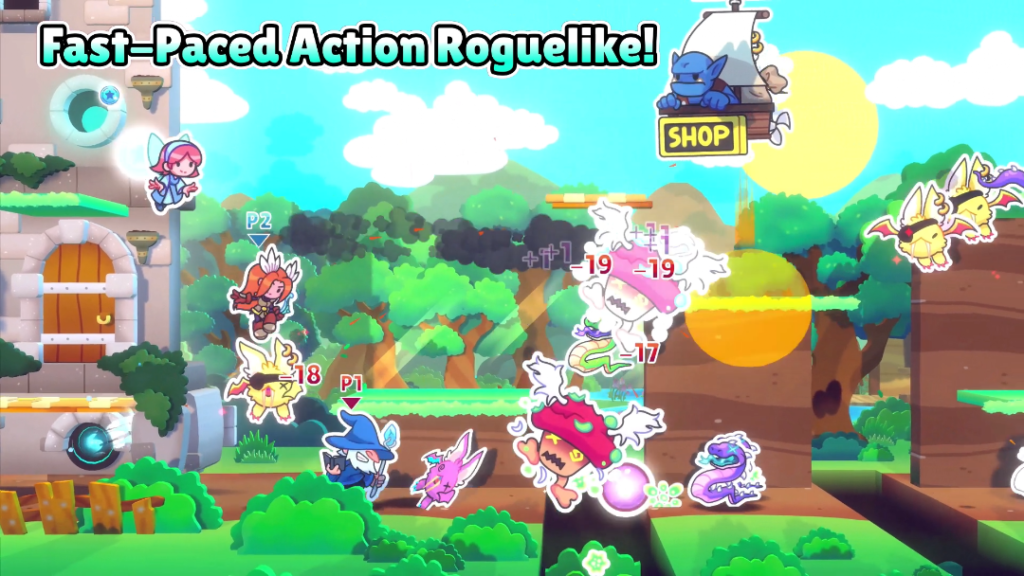
Castlebound co-op supports up to four players on one system, and the game can also be played solo. Ogre Pixel released the walking-castle action platformer on November 11, 2026, on Steam, Nintendo Switch and Nintendo Switch 2. On Steam, the store lists Remote Play Together as an option for inviting people who are somewhere else. Nintendo’s Switch 2 listing specifies local co-op.
Start with the Steam store and free demo if you’re deciding whether it suits your group. Check the Nintendo Switch 2 listing for supported modes and the availability shown in your console’s store region.
Castlebound co-op on PC and Nintendo Switch
For a group in the same room, the straightforward setup is one copy of the game and a controller for each extra player. Steam’s store page specifically says local multiplayer requires additional controllers. Nintendo’s Switch 2 listing supports one to four people on a single system and lists TV, tabletop and handheld modes. If four people are sharing one display, TV mode gives everyone more room to follow their character.
For friends in separate homes, Steam’s Remote Play Together works by streaming the host’s running game and sending guest input back. Look for the invite option in Steam after launching the game. A slow or unstable connection can make precise platforming harder, so check responsiveness before committing to a longer session. Nintendo’s store entry lists local multiplayer and a separate cloud-save feature through Nintendo Switch Online. The cloud-save listing is about backing up progress.
How the walking castle changes the action
In a typical defence game, a base stays in place while enemies arrive. Here, the fortress moves. Players jump, dodge and attack while defending it against waves of enemies. Ogre Pixel’s game overview introduces Lenora, an archer, and Vargus, who help awaken the fortress. Different heroes give players different ways to fight, and the developer describes a progression system that unlocks skills, upgrades and characters over successive runs.
If your group is new to action platformers, agree on who will watch the fortress when someone moves ahead to fight. A moving objective can make it easy for everybody to follow the same enemy. Talking through which part of the screen each person will cover is a simple way to avoid that. If you prefer solo play, the demo can help you judge how much attention you need to split between jumping and keeping up with the castle.
Before a local session, pair each controller and confirm that the game recognises separate inputs. If a second controller appears to control the same hero, check the controller assignment in the platform’s input settings before starting a run. A quick practice run is also a chance to see whether players can distinguish their characters against the storybook backgrounds when enemies fill the screen.
Try the demo before you buy
The Steam page lists an 8 GB memory minimum and 1 GB of storage across its Windows, macOS and Linux entries. For Windows it also lists Windows 10 and an Intel Core i3 at 3.2 GHz. These are published minimums. Use the demo to see how your own machine handles the action, check controller recognition and find a comfortable screen layout.
Steam shows an introductory offer through November 25. If you shop from India, use the price shown in your signed-in store and check the final amount before paying. The Steam storefront can show another region’s price when you open a link outside the client. Start with the demo if you’re buying mainly for couch co-op, and check your controller setup before the first group session. For other releases, see Bootpoot’s games coverage.
Gameplay screenshot courtesy of Ogre Pixel.