Samsung Galaxy A27 5G Buying Guide for Students
The Samsung Galaxy A27 5G is back in Samsung India’s news coverage this week, with a 4 November feature highlighting its display, cameras and software support. For students choosing a phone, the useful question is how those features fit a day of classes, travel and assignments. This guide explains the confirmed essentials and the checks worth making in a shop.
It is based on Samsung’s published specifications and buying considerations. A brief store demonstration can answer questions about size and controls that a specification sheet leaves open.
Samsung Galaxy A27 5G essentials
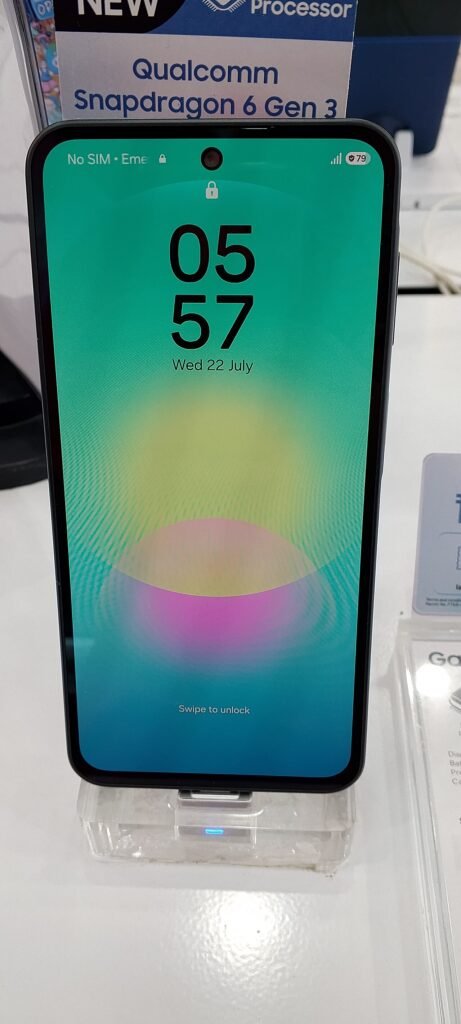
Samsung lists a 6.7-inch AMOLED screen with refresh rates up to 120Hz, a Snapdragon 6 Gen 3 processor and a 5,000mAh battery with 25W charging. Camera hardware includes a stabilised 50MP main camera, a 5MP ultrawide, a 2MP macro and a 12MP front camera. The company promises up to six generations of operating-system upgrades and six years of security updates. These details are in its November product overview.
Samsung’s June India launch announcement listed several storage options and launch offers. Treat those offers as historical. Ask for today’s price for the exact memory configuration before comparing it with another handset.
Read an actual document on the display
Open a long article or a sample PDF and adjust the text to your usual reading size. Check whether you can follow a paragraph comfortably while holding the phone as you would on a bus. A screen that looks striking when playing a demonstration video may feel different when displaying a dense page of notes.
Try the keyboard with both hands and then with one. Put the device in the pocket or bag compartment you normally use, with the shop’s permission. Those ordinary movements can tell you more about daily comfort than staring at the phone from across a counter.
Test the camera for study tasks
If photographing notes matters, ask to capture a printed page under the shop’s normal lighting. Zoom in on the corners and small text. Check whether you can share the image as a legible document without retaking it several times.
For video calls, inspect the front-camera preview at a natural distance. Think about where you prop your current phone during online lessons. A stable stand, suitable lighting and a quiet microphone setup can make a bigger practical difference than choosing a device from megapixel figures alone.
Choose storage around your downloads
Look at how much space your current phone uses for class videos, messages, photos and offline maps. Write that number down before visiting the shop. Add room for the apps and files you expect to keep next year, particularly if you download lessons ahead of unreliable connectivity.
Compare the full price difference between storage variants. If an offer requires an exchange, record the assessed exchange value separately. It becomes easier to compare two shops when the handset price and the value of your old device occupy different lines on the quotation.
Try one useful AI task
Rather than exploring every promotional feature, choose a task you would repeat. Ask for a demonstration of finding information from the screen or locating a detail in a supported recording. Check the available language, account requirements and internet connection before deciding whether the feature solves your problem.
When an assistant produces study notes, compare a short passage against the original material. Keep the source document and correct errors before revising from the summary. This also helps you judge whether the extra step saves time for the subjects you actually study.
Compare the complete cost
Ask what is included in the box and price any accessories you need. If financing is involved, compare the total amount payable, instalments, fees and any conditions attached to the advertised price. Keep a screenshot or written copy of the final offer.
The A27’s specification is a starting point for a student shortlist. Choose after trying your reading, document-camera and storage needs on the actual device. You can also browse Bootpoot’s Tech News coverage before comparing another model at the same final price.
Samsung Galaxy A27 5G front panel. Photo by JGBlue1509, Wikimedia Commons, CC BY 4.0.